Section Two — Build a Case Study
What this section does
Gives you a repeatable outline, complete with writing prompts and visual placeholders, to turn each project into a compelling, recruiter-ready case study in under 90 minutes.
Case Study Outline
| Guiding prompt | Word / asset limit | Pro tip | |
|---|---|---|---|
1. Project Snapshot |
“Why did this project matter to users and the business?” |
60–100 words |
Anchor to a metric (conversion ↑, churn ↓). |
2. Problem Statement |
“In one sentence, what did you design and for whom?” |
25 words |
Make it skimmable — think newsletter headline. |
3. Context & Constraints |
“What guardrails shaped your solution — time, tech, budget?” |
3 bullet points |
Shows you can design within real-world limits. |
4. Role & Team |
“What did you personally own, and who else was involved?” |
2–3 lines |
Clarify ownership; avoid “we” blur. |
5. Research & Insights |
“How did you discover the underlying user need?” |
120–150 words + 1 screenshot |
Prioritise insight > method list. |
6. Ideation & Trade-offs |
“What options did you generate, and why did you choose this one?” |
2 images + 80-word rationale |
Show at least one path you cut. |
7. Final Solution |
“What does the final flow or UI look like?” |
3–5 annotated frames |
Use call-outs, not paragraphs, to explain. |
8. Outcome & Impact |
“What changed after launch?” |
Metric table + 60-word narrative |
If you lack live data, use proxy signals (usability score). |
9. Reflection & Next Steps |
“What did you learn and what would you improve?” |
50–70 words |
Humility + growth mindset beats perfection. |
Case Study Template
Copy the plain-text template below into Google Docs or Notion to start working through your own portfolio. Once pasted, you can quickly format the headers (Heading 1, Heading 2, etc.) to generate an automatic table of contents, making it easier to navigate as your project list grows.
Case Study Template


[PROJECT NAME] – Case Study
1. Project Snapshot
One crisp sentence that says what you designed, for whom, and why it mattered.
2. Problem Statement
60–80 words summarising the user pain point and business impact. (Example metric to cite: baseline conversion, churn, NPS, etc.)
3. Context and Constraints
-
Timeframe:
(e.g. 2-week sprint)
-
Team & stakeholders:
(roles, not names)
-
Tech/budget/regulatory limits:
4. Role & Responsibilities
5. Research & Key Insights
-
Method(s) used:
(e.g. 7 user interviews, 2 usability tests)
-
Core insight 1:
-
Core insight 2:
6. Ideation & Trade-offs
Briefly describe alternative concepts explored and why you chose the final direction.
7. Final Solution
[PASTE 2–4 KEY SCREENS OR FLOW IMAGES HERE]
Caption each image with a single line that ties back to an insight.
8. Outcome & Impact
Primary KPI (e.g. sign-ups)
Before:
After:
Δ:
Secondary KPI(e.g. task completion)
Before:
After:
Δ:
Qualitative Signal (e.g. SUS score)
Before:
After:
Δ:
9. Reflection and Next Steps
-
What you’d improve if you had more time:
-
One lesson you’ll carry into the next project:

Think of it as setting up your workspace before the real design work begins.
Example: Portfolio
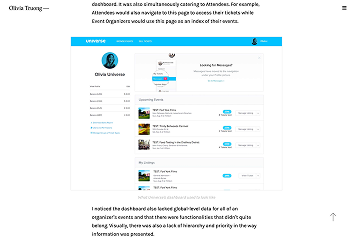
See how Olivia, a senior product designer, used the How Might We’ framework
The ‘How Might We’ framework is an industry-wide technique for framing problems, ideating and refining solutions.

Example: Quick-start template
Quick-start template
Project Snapshot: |
Redesigned onboarding for a fitness-tracking iOS app used by 200k monthly active users. |
Problem Statement: |
30% of new users abandoned the app before completing profile set-up, blocking monetisation |
Constraint: |
2-week sprint; no back-end changes allowed. |
My role/responsibilities: |
UX/UI Designer; Led UX design and flow updates, ran ideation sessions, produced wireframes and prototypes. |
Key Insight: |
User interviews revealed confusion around calorie-goal terminology; 68% thought “caloric deficit” sounded negative. |
Ideation/trade-off: |
Considered copy-only updates, tooltips, or restructuring the flow to maximise impact within time and technical limits. |
Solution: |
Replaced negative copy terms, added a brief visual explainer, and streamlined steps to reduce cognitive load. |
Outcome: |
Onboarding completion up 14 pp; 11% lift in first-week retention.– |
Reflection: |
Language tweaks and small UX adjustments can deliver outsized results, especially when paired with rapid user testing and iteration. |

“Scanability is one of the most important aspects of a portfolio. When I’m hiring, it’s not uncommon for me to spend 2–5 minutes reviewing a portfolio before deciding whether to invite someone for an interview, at which point we’ll likely go through the case study in detail. At this initial screener stage, I’m quickly looking to see if they demonstrated the skills needed for the job.”
– Justin Hrabec,, Subject Matter Lead and Facilitator on the King’s Career Accelerator
Why it matters
- Consistency saves time: Same scaffold for every project means less cognitive load.
- Evidence > fluff: Prompts push you to surface measurable outcomes — not just pretty screens.
- Scannable by design: Recruiters spend ~2-5min minutes scanning portfolios before they decide to interview; the block layout highlights what they care about first.