Section Three — Storytelling & Evidence Toolkit
What this section does
This section teaches you to transform raw research, wireframes and screenshots into a concise, evidence-backed narrative for your portfolio that makes hiring managers say, “show me more.”
Core Building Blocks
Below is a summary of each exercise you’ll run to add narrative arcs, metrics and proof points to your chosen case studies.
| What’s inside | Pro tip | |
|---|---|---|
Block ANarrative Framework Cheatsheet |
3 proven arcs:
Each with one-line slot-in prompts. |
Pick one framework per case study to keep the story tight and recruiter-skimmable. |
Block BMetrics & Evidence Menu |
A quick-reference chart of 25 metrics grouped by User Value, UX Quality, Business Impact. Includes formulas and where to collect them (product analytics, usability testing tools and so on). |
Identify the 2-3 numbers that best prove your impact, even if you lack live product data. |
Block CInsight-to-Impact Mapper |
Worksheet that links a single research insight → design decision → metric movement → visual proof. |
Prevents “nice research, so what?” syndrome; anchors design choices in evidence. |
Block DProof Point Copy Bank |
40 sentence starters to replace vague claims with concrete proof (“Reduced checkout steps from 8 → 4, cutting drop-off by 27%”). |
Speeds editing and keeps tone outcome-focused. |
Building Block A: Narrative framework cheatsheet
Use one of these proven story arcs to keep each case study tight, evidence-driven and recruiter-friendly. Pick the framework that best matches the scope of your project and the depth of data you have available.
STAR Framework
(Situation → Task → Action → Result)


Core Structure
Situation– Context & pain point
Task – Your specific goal
Action – What you did
Result – Measurable impact
Best used for:
Short projects or single-feature wins where you own most of the work
Fill-in-the-Blank Prompts
“Users were
because
“
“I needed to
within
“
“I
by
“
“This led to
(metric).”
Quick Example
“30% of new users quit step 3. I had two weeks to raise completion. I rewrote the micro-copy and added progress dots, lifting completion to 68%.”
CAR Framework
(Challenge → Action → Result)
Core Structure
Challenge – The obstacle or KPI lag
Action – Your contributions
Result – Tangible change
Best used for:
Portfolio pieces where you had limited influence over scope (e.g. group hackathons)
Fill-in-the-Blank Prompts
“
was under-performing by
“
“I
with.”
“Improved from
to
“
Quick Example
“Checkout drop-off was 54%. I mapped the flow and removed two fields; drop-off fell to 32%.”
3-ACT UX Story Framework
(Problem → Process → Outcome)
Core Structure
Problem – User & business stakes
Process – Research, ideation, validation loops
Outcome – KPI lift + future roadmap
Best used for:
End-to-end redesigns or multi-sprint projects where story depth matters.
Fill-in-the-Blank Prompts
“We discovered
affected
users.”
“Through
we learned
leading us to
“
“Improved from
to
“
Quick Example
“Confusing filter UI hurt discoverability for 70% of sellers. After diary studies and wireframe tests we shipped a facet panel; search-to-add-to-cart rose 19%.”
PAR Framework
(Problem → Action → Result)
Core Structure
Problem – Surface-level issue
Action – Key design moves
Result – Visual proof & metric
Best used for:
Quick read-outs for visual-heavy projects (UI refresh, design systems)
Fill-in-the-Blank Prompts
“
looked/behaved poorly because
“
“I introduced
and
“
“Time-on-task fell by
“
Quick Example
“Search bar blended into the nav. I added contrast and auto-suggest; query success time dropped 4 → 2 s.”
PSO Framework
(Problem → Action → Result)
Core Structure
Problem – Unmet need
Solution – Proposed design
Outcome – Expected benefit
Best used for:
Concept pieces or academic projects where metrics are projections
Fill-in-the-Blank Prompts
“
can’t
“
“We designed
“
Usability tests predict SUS 85/100.”
Quick Example
“Elderly users can’t adjust font size. We created a one-tap toggle; hallway testing forecasts SUS 87.”
How to pick the right arc:
- Check your data depth – If you have real metrics, use STAR/CAR; if proxy data, lean on 3-ACT UX Story or PSO.
- Match project length – Single-feature fixes fit STAR; multi-sprint work shines with 3-ACT UX Story.
- Respect reader time – Keep the Result/Outcome to one headline metric plus a supporting number (e.g., +14 pp completion, 1000 new MAU).
Example: Portfolio
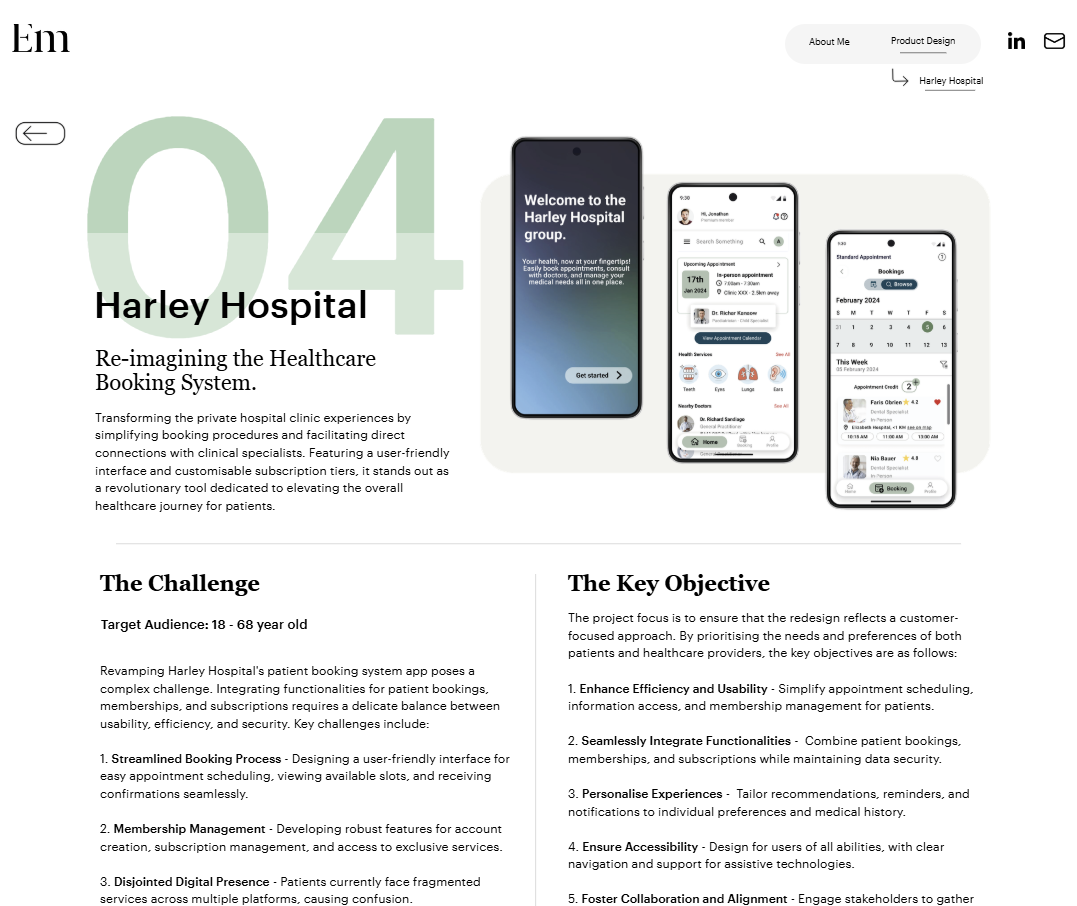
Emma’s PAR Case Study from a Career Accelerator Project
Emma, a King’s UX & UI Product Design Career Accelerator Alumna, turned one of the programme’s practical projects into an impactful case study that showcases the Problem → Action → Result (PAR) framework.

Building Block B: Metrics & Evidence Menu
Choose 2–3 metrics per case study to prove your design made a difference — one from each column below is usually enough.
| Metric | Simple Formula / Unit | Where to Pull the Data | Good to Use When… |
|---|---|---|---|
| User Value | |||
| Task-Success Rate | Successful attempts ÷ total attempts | Usability-test platform | You redesigned a flow or micro-interaction. |
| Time-on-Task | Avg. seconds to complete task | Session recordings, product analytics events | Session recordings (Hotjar), GA4 events |
| System Usability Scale (SUS) | 0–100 score | SUS survey post-test | You’re comparing “before/after” usability. |
| Feature Adoption % | Monthly active users of feature ÷ total MAU | Amplitude cohort, Mixpanel event | You shipped a net-new capability. |
| Net Promoter Score (Feature-level) | % Promoters – % Detractors | In-app micro-survey | You changed an experience users evangelise. |
| UX Quality | |||
| Completion Rate | Finished flow ÷ started flow | Funnel analysis in product analytics | You reduced friction or cognitive load. |
| Error Rate | Errors ÷ attempts | Support tickets, error logs | You reduced friction or cognitive load. |
| First-Click Success | Users who click correct UI area first ÷ total | Eye-tracking / click-map tool | You reorganised navigation or IA. |
| Accessibility Pass | WCAG AA violations count | Automated accessibility checker, browser audit score | You improved colour contrast or semantics. |
| Cognitive Load (NASA-TLX) | 1–100 index | Short NASA-TLX survey | You simplified complex data entry. |
| Business Impact | |||
| Conversion Rate | Conversions ÷ visitors | Analytics goals, backend events | You optimised pricing, signup, or checkout. |
| Retention / Churn | % users active after X days | Cohort report in product analytics | You improved core value or habit loops. |
| Unassisted Task Completion | Participants who finish the task without help ÷ total participants | Moderated or unmoderated usability test | You simplified a flow so people no longer need guidance. |
| Support Tickets per 1000 MAU | Tickets ÷ 1000 users | Support desk reports | You resolved recurring usability pain. |
| Customer Satisfaction (CSAT) | % of respondents rating the experience 4 or 5 out of 5 | Post-task or in-app survey | You improved a key moment in the journey. |
Building Block C: Insight-to-impact mapper
Turn raw research findings into “why we did X” proof points that recruiters love. Copy the worksheet block below into a document and replace the brackets. After filling a row for each major insight, you’ll have a ready-made slide or paragraph that explains the chain from evidence → design choice → measurable outcome.
Insight-to-Impact Mapper
Insight-to-Impact Mapper
1. Project Snapshot
- Source: [ e.g., 7 remote interviews ]
- Finding: [ “60% of users abandoned sign-up at ‘caloric deficit’ step” ]
2. Design Decision
- Change: [ Rewrote jargon as plain-language copy; added progress bar ]
- Trade-off considered: [ Kept flow length; no dev time for extra screen ]
3. Implementation Evidence
- Screenshot/link: [ Paste frame or prototype URL ]
- Annotation: [ Arrow call-out: “New wording + progress dots” ]
4. Outcome Metric
- KPI: [ Completion rate ]
- Before → After data: [ 42% → 68% (+26 pp) ]
5. Visual Proof
- Chart type: [ Small bar or line chart ]
- Caption: [ Completion up 26 pp within 14 days of launch ]
How to use it
- Pull one headline insight — Duplicate the block for each additional insight; keep one Mapper per case study page to stay scannable.
- Fill sections 1–2 first while research is fresh.
- Add outcome data last, once the feature has shipped or testing is complete.
- Export as image (Google Docs → File → Download → PNG) and drop it next to the corresponding screen in your Case Study Template.

Stack two or three of them in every case study and your portfolio will read like a set of mini business cases — exactly what UX leads want to see.
Building Block D: Proof point bank
Here are 40 sentence starters that swap vague claims for crisp, evidence-driven language. Paste these starters into your case-study doc, fill the blanks, and you’ll swap fluffy claims for concrete statements that hiring managers trust.
How to use it
- Pull one headline insight — Duplicate the block for each additional insight; keep one Mapper per case study page to stay scannable.
- Fill sections 1–2 first while research is fresh.
- Add outcome data last, once the feature has shipped or testing is complete.
- Export as image (Google Docs → File → Download → PNG) and drop it next to the corresponding screen in your Case Study Template.
Proof point starters
Problem / Insight (10 starters)
- “Usability tests showed [ % ] of users quit at [ step ] because [ reason ].”
- “Support tickets spiked [ × ] in one month, pointing to [ pain point ].”
- “Analytics revealed a [ % ] drop-off between [ screen A ] and [ screen B ].”
- “Diary studies flagged [ top frustration ] as a daily blocker for [ persona ].”
- “Heat-map clicks clustered on [ misleading element ], signalling confusion.”
- “NPS slid from [ score ] to [ score ] after the new release.”
- “First-click success sat at only [ % ], far below the NN/g 80 % benchmark.”
- “Accessibility audit surfaced [ # ] WCAG AA failures—mostly colour contrast.”
- “Churn interviews cited [ missing feature ] as the #1 reason for leaving.”
- “Competitive teardown showed rivals offered [ feature ] in half the steps.”
Action / Decision (15 starters)
- “I redesigned [ component ] in plain language, cutting jargon like [ term ].”
- “Introduced a four-step wizard to replace the single overwhelming form.”
- “Merged two redundant flows, removing [ # ] clicks per task.”
- “Added auto-save, preventing data loss during [ context ] sessions.”
- “Ran an A/B test contrasting [ variant A ] vs [ variant B ] over two weeks.”
- “Created a responsive 8-pt grid to align UI across breakpoints.”
- “Embedded progress indicators to set user expectations up-front.”
- “Partnered with devs to lazy-load images, improving FCP by [ ms ].”
- “Implemented WCAG-compliant colour palette, boosting contrast ratios above 4.5:1.”
- “Facilitated a design-studio workshop with [ # ] stakeholders to co-ideate solutions.”
- “Prototyped three concepts in Figma and validated with [ # ] users in 24 hours.”
- “Re-ordered onboarding questions by cognitive load to maintain flow momentum.”
- “Inserted contextual tooltips triggered by [ event ], reducing help-article visits.”
- “Mapped edge cases, then added error states for [ scenario ].”
- “Swapped modal interruptions for inline edits, keeping users in context.”
Outcome / Impact (10 starters)
- “Completion rate jumped from [ % ] to [ % ], a [ pp ] lift.”
- “Time-on-task fell [ seconds ]—a [ % ] improvement.”
- “Error rate dropped [ % ] after launch, slashing support tickets by [ # ].”
- “Activated [ # ] new paying users within the first month.”
- “Feature adoption climbed to [ % ] of MAU, doubling usage targets.”
- “SUS score rose from [ score ] to [ score ], entering the ‘Excellent’ range.”
- “Revenue per user increased [ currency ] after the checkout redesign.”
- “First-contentful paint improved by [ ms ], lifting mobile SEO to 95 / 100.”
- “Churn dropped [ pp ] quarter-over-quarter, reversing a year-long decline.”
- “NPS bounced back to [ score ], with Promoters citing ‘simplicity’ and ‘speed’.”
Reflection / Next Steps (5 starters)
- “If time allowed, I’d A/B test [ variation ] to optimise [ metric ] further.”
- “Next release will localise the flow for [ language ] to serve [ region ] users.”
- “Plan to pair with analytics to correlate [ UX metric ] and revenue more tightly.”
- “Would explore motion cues to guide attention without adding cognitive load.”
- “The redesign sparked ideas for [ feature ], which I’m now scoping for MVP.”
Placement tips
- Use starters 1–10 in Problem Statement or Research paragraphs.
- Use 11–25 in Action / Process blocks.
- Drop 26–35 into the Outcome & Impact section — pair with a mini chart if possible.
- Finish with 36–40 under Reflection & Next Steps.